Sortinghat vs Recruit CRM: The 2026 Comparison for Growing Recruitment Agencies
Recruit CRM records what your recruiters did. Sortinghat does the work instead, then records it.
Recruit CRM is easy to adopt because there is not much to adopt. It is a system of record: it stores what your recruiters did rather than doing any of it. Sortinghat covers the same ground and then makes the screening calls, generates the evaluation criteria, writes the notes and runs the back office, which is why firms move across as soon as recruiter capacity becomes the constraint.
Last reviewed June 2026. Recruit CRM information taken from its published pricing and product documentation.
Key takeaways
- Recruit CRM records the work. Sortinghat does a large part of it. AI voice and video screening, generated evaluation criteria, plain-language search and an AI notetaker, all native.
- Full front and back office. Pay-and-bill, timesheets and invoicing alongside the ATS and CRM, plus 400+ pre-built integrations.
- We have migrated firms off it. Two weeks, nothing left behind, implementation and training included.
- Migration takes two weeks and nothing is left behind. Notes, call history, attachments and submission history all carry across, and anything your desk needs that is missing gets built during the migration rather than added to a roadmap.
A system of record versus a system that works
Recruit CRM's approach. A simple ATS and CRM. Candidates and clients in one place, with the recruiter driving every single action. Nothing happens unless somebody does it by hand.
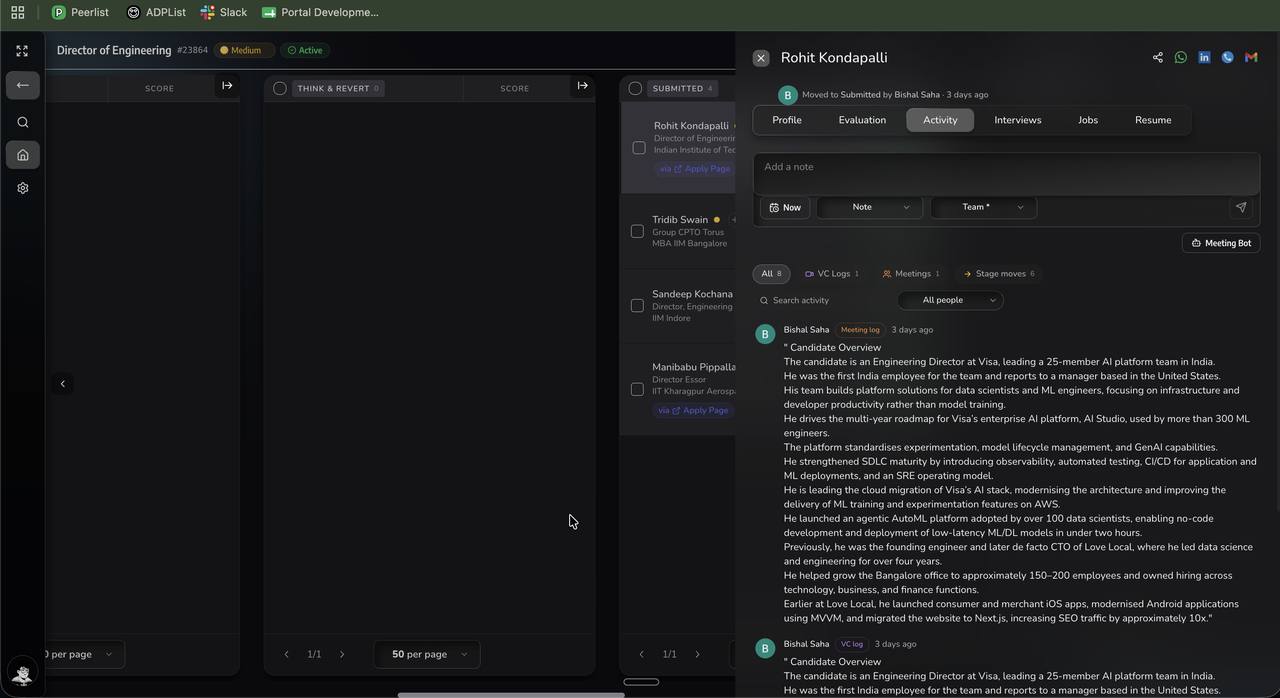
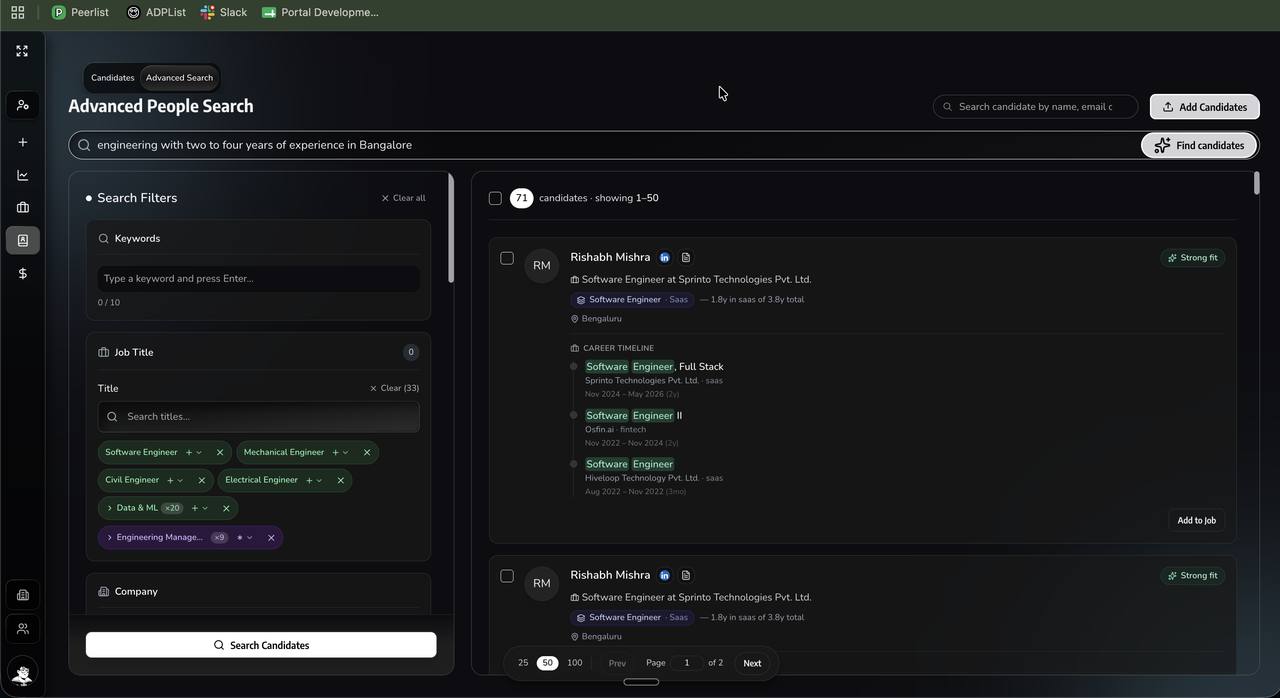
Sortinghat's approach. The same coverage with the manual work removed. Plain-language search across your own records, AI voice and video screening against the role's criteria, evaluation criteria generated from the job description, notes written automatically from calls and WhatsApp, and full back office underneath.
Simplicity is only a feature while your desk is small. Once the constraint is how many roles each recruiter can carry, a tidy record of the bottleneck is not a solution to it.
Sortinghat vs Recruit CRM at a glance
| Category | Recruit CRM | Sortinghat |
|---|---|---|
| Core approach | Clean system of record | Platform that does the work as well as record it |
| AI voice screening | Not native | Native, 70% completion, 3 to 7 minutes |
| AI video interviews | Not native | Native |
| Search | Filter and keyword | Plain language, ranked, explainable |
| Evaluation | Standard scoring | Weighted criteria generated from the job description |
| AI notetaker | Not native | Native on client and candidate calls |
| Back office | Front office focused | Full front and back office, pay-and-bill, timesheets, invoicing |
| Integrations | Established set | 400+ pre-built, plus open read-write API |
| Volume handling | Low to moderate | 1,200 surfaced, 300 contacted in parallel, 10 submission-ready in hours |
| Implementation | Self-serve | Two weeks, included, gaps built during migration |
The volume row is where firms notice the ceiling. A system of record does not care how many roles you are running, which is exactly the problem once you are running a lot of them.
Where the two platforms actually differ
Finding people in your own database
Recruit CRM. Search is filter and keyword driven, so results depend on how precisely the query was built. An imprecise query quietly misses qualified people.
Sortinghat. Describe the person in a sentence, including conditions that are judgements rather than keywords. Our audit of one firm's 3 million records found 80% were real, current people behind stale records, and making them findable took job portal spend from roughly $100 a role to $60.
Bottom line: A database nobody can search is storage you are paying to keep.
Qualifying the people you find
Recruit CRM. Screening is a recruiter activity. A full manual calling day is around 40 calls and produces three or four people worth submitting.
Sortinghat. AI voice and video screening runs against the role's weighted criteria, confirming interest, availability, compensation and the CV claims that decide the submission. Around 300 contacted in parallel produces roughly 10 submission-ready profiles in hours, and on a high-volume QA requirement we submitted 120 in a single day.
Bottom line: This is the difference that shows up in placements rather than in a feature list.
Reporting and desk economics
Recruit CRM. Reporting covers pipeline and activity. Connecting recruiter activity to desk margin generally means exporting and rebuilding it outside the platform.
Sortinghat. Desk margin, recruiter capacity and pipeline forecasting sit in the same workspace as the data they measure, so a founder sees which desks are profitable without a spreadsheet in between.
Bottom line: Reporting activity is not the same as knowing what it earned.
Adoption, which is where most rollouts fail
Recruit CRM. Implementation is self-serve or guided, and whether the team adopts it is left to the team.
Sortinghat. Implementation, migration, training and any gap-filling customisation are included in the licence. If your desk depends on something the platform does not have, we build it inside the migration window rather than logging it on a roadmap.
Bottom line: The most common failure in this category is not a bad platform. It is a good one nobody switched to.
What each platform actually costs to run
Recruit CRM publishes per-seat tiers aimed at small and mid-sized agencies. Compare the tier you would actually use, and check which capabilities sit behind higher tiers before comparing headline numbers.
The licence is rarely the largest line. Six costs decide what a platform actually costs over three years:
| Cost line | On the quote? | How it behaves |
|---|---|---|
| Licence | Yes | Seats times tier price, plus renewal escalation |
| Implementation | Sometimes | One-off, often via a partner. Included with Sortinghat. |
| Migration | Rarely | Vendor fee plus your team's hours. Included with Sortinghat. |
| Modules to reach a working setup | No | Where quotes diverge most between vendors |
| Recruiter hours | No | The largest line by far, and the one nobody models |
| Job portal spend | No | Does it reduce it? One firm went from $100 a role to $60 |
The last two lines are usually larger than the first four combined. A platform that removes an hour a day from every recruiter is not comparable to one that costs slightly less per seat.
What Sortinghat does that Recruit CRM does not
AI is in the platform, not on the invoice
Voice screening, video interviews, the AI interview assistant, evaluation against weighted criteria, natural language search and the notetaker are all part of the platform. There is no AI tier, no separate contract and no account manager conversation before you can use them.
Search is a sentence, not a Boolean string
Describe the person you want and get a ranked result. Compound conditions that never appear as keywords, institution tier, company stage, domain depth, resolve without anyone building a query. Sourcers are productive in a session rather than a quarter.
Screening runs at enterprise volume
A pool search on a volume role surfaces around 1,200 relevant profiles, narrows to a ranked 300, and contacts them by call, WhatsApp and email in parallel. That produces roughly 10 submission-ready profiles in hours. On a high-volume QA requirement we submitted 120 profiles in a single day.
Full front and back office
Timesheets, invoicing and pay-and-bill alongside the ATS and CRM, with client-specific formats built to your requirement rather than configured around.
400+ pre-built integrations
Job portals, messaging, calendar, assessment, interview and finance systems, plus an open read-write API for everything else.
Migration in two weeks, and gaps get built
Notes, call history, attachments and submission history carry across. If your desk depends on something the platform does not have yet, we build it inside the migration window rather than logging it on a roadmap. Implementation, migration, training and that customisation are included.
Built for firms running at scale
Our customers include firms of 400+ employees. The platform is designed for enterprise staffing volume rather than scaled down from it.
Switching from Recruit CRM: what it takes
We have run Recruit CRM migrations and they are among the most straightforward we do.
- The data model is simple, which makes mapping predictable and validation quick.
- Email and activity threading. We verify conversation history arrives threaded to the person rather than as a flat log.
- Pipelines get rebuilt rather than transferred, which is usually an opportunity to remove stages that were added and never used.
- Notes, calls, attachments and submission history all carry across, validated with your team before sign-off.
Our migrations run in two weeks. Week one is export, field mapping and validation while your team keeps billing. Week two is your own environment, your team's specifics and full validation before anyone signs off. Go-live is a final export and cutover with no downtime. Implementation, migration, training and any customisation your desk needs are included rather than quoted as professional services.
Where Recruit CRM is still a good choice
Not every firm should switch, and these are the cases where Recruit CRM remains the better answer.
- You renewed a multi-year agreement last quarter. Switching economics work better at renewal. Note the date and revisit then.
- You went live in the last twelve months. If the team has just absorbed one implementation, another this year is a hard internal sell.
Frequently asked questions
What is the best Recruit CRM alternative?
For firms whose constraint is recruiter capacity rather than record keeping, Sortinghat adds AI voice and video screening, plain-language search, generated evaluation criteria and full back office. We have migrated firms across and it takes two weeks.
How much does Recruit CRM cost?
It publishes per-seat tiers aimed at small and mid-sized agencies. Compare the tier you would actually use rather than the entry headline, since capability varies significantly between tiers.
When should you move off Recruit CRM?
When recruiters are at capacity, your database has grown past the point anyone searches it usefully, and new roles start on a job portal by default because the internal search is not worth running.
Can you migrate from Recruit CRM easily?
Yes, and it is among the most straightforward migrations we run. The data model is simple and volumes are usually modest. Notes, calls, attachments and submission history all carry across.
Does Sortinghat have back office?
Yes. Full front and back office including pay-and-bill, timesheets and invoicing, alongside the ATS and CRM, with 400+ pre-built integrations and an open read-write API.
Is Sortinghat only for large firms?
No, though it is built to run at scale. Our customers include firms of 400+ employees, and the same platform serves growing agencies without a different edition or a different price for the AI.
Bottom line
Recruit CRM does what it sets out to do, and what it sets out to do is hold your records tidily. Sortinghat covers the same ground and adds the parts that change output: AI voice and video screening, plain-language search, generated evaluation criteria, an AI notetaker and full back office, with 400+ pre-built integrations. If your recruiters are at capacity, the constraint is not how tidy the records are.
See it running on your own data
Bring a live role and a sample of your database. We will run the search, build the scorecard and show you the shortlist against your own criteria.
Book a demoFounder of Sortinghat, an AI-native ATS and CRM for staffing, search and RPO firms. Writes about recruiter capacity, sourcing economics and what actually changes when AI reaches a delivery desk. More about the author
Related reading
Sortinghat vs Zoho Recruit: The 2026 Comparison for Growing Recruitment Agencies
Product Comparison 101Sortinghat vs Recruiterflow: The 2026 Comparison for Growing Recruitment Agencies
Product Comparison 101Sortinghat vs Manatal: The 2026 Comparison for Growing Recruitment Teams
Product Comparison 101Sortinghat vs Avionte: The 2026 Comparison for Temp and Light Industrial Staffing